
Appearance
Suspense
在 16.6 版本之前,code-spliting 通常是由第三方库来完成的,比如 react-loadble(核心思路为: 高阶组件 + webpack dynamic import), 在 16.6 版本中提供了 Suspense 和 lazy 这两个钩子, 因此在之后的版本中便可以使用其来实现 Code Spliting
作用
- 资源预加载
可以配合 React.lazy 使用,提前加载组件资源。
- 异步数据处理
在 Concurrent 模式中,Suspense 能够在数据获取时显示回退(fallback)内容,等数据加载完成后再渲染组件。
例子
jsx
import { Suspense, lazy } from 'react'

const DemoA = lazy(() => import('./demo/a'))
const DemoB = lazy(() => import('./demo/b'))

<Suspense>
  <NavLink to="/demoA">DemoA</NavLink>
  <NavLink to="/demoB">DemoB</NavLink>

  <Router>
    <DemoA path="/demoA" />
    <DemoB path="/demoB" />
  </Router>
</Suspense>
源码解析
对于 Lazy 组件的渲染流程,其仍然是在 beginWork 阶段进行的, 通过 case : SuspenseComponent 判断当前组件为 Suspense 组件,然后进入其 updateSuspenseComponent流程。
Primary 初始化渲染
js
function updateSuspenseComponent(current, workInProgress, renderLanes) {
  const nextProps = workInProgress.pendingProps;

  // 获取当前的 Suspense 上下文
  let suspenseContext: SuspenseContext = suspenseStackCursor.current;
  // 是否需要显示 fallback (加载中状态)
  let showFallback = false;
  // 在 Lazy 组件未加载完成的情况下,其通过throw 异常的方式进入 handleError 流程
  // 通过 throwException 找到当前组件 并标记 ShouldCapture
  // 通过 completeUnitOfWork 阶段的 unwindWork 流程 向上冒泡 将 ShouldCapture 转换成 DidCapture
  const didSuspend = (workInProgress.flags & DidCapture) !== NoFlags;
  // 需要进入加载中状态

  // Attempting the main content
  if (
    current === null ||
    (current.memoizedState: null | SuspenseState) !== null
  ) {
    // This is a new mount or this boundary is already showing a fallback state.
    // Mark this subtree context as having at least one invisible parent that could
    // handle the fallback state.
    // Avoided boundaries are not considered since they cannot handle preferred fallback states.
    if (
      !enableSuspenseAvoidThisFallback ||
      nextProps.unstable_avoidThisFallback !== true
    ) {
      suspenseContext = addSubtreeSuspenseContext(
        suspenseContext,
        InvisibleParentSuspenseContext
      );
    }
  }

  // 将新的 Suspense 设置到上下文中
  suspenseContext = setDefaultShallowSuspenseContext(suspenseContext);
  // 将新的上下文压栈
  pushSuspenseContext(workInProgress, suspenseContext);

  if (current === null) {
    // Initial mount
    // This could've been a dehydrated suspense component.
    const suspenseState: null | SuspenseState = workInProgress.memoizedState;
    if (suspenseState !== null) {
      const dehydrated = suspenseState.dehydrated;
      if (dehydrated !== null) {
        return mountDehydratedSuspenseComponent(
          workInProgress,
          dehydrated,
          renderLanes
        );
      }
    }
    // 动态加载的子节点
    const nextPrimaryChildren = nextProps.children;
    // 动态加载子节点加载期间显示的内容
    const nextFallbackChildren = nextProps.fallback;
    // 如果

    // 第一次 去初始化执行动态加载子节点
    return mountSuspensePrimaryChildren(
      workInProgress,
      nextPrimaryChildren,
      renderLanes
    );
  }
}
从源码可以看出,在初次渲染的时候,其核心流程如下:
- 初始化 Suspense 上下文
通过 suspenseStackCursor.current 缓存当前的 Suspense 上下文中的类型,其具体类型有如下几种:
- DefaultSuspenseContext: SuspenseContext = 0b00;
默认的 Suspense 上下文状态,通常用于表示当前没有任何 Suspense 边界。
- SubtreeSuspenseContextMask: SuspenseContext = 0b01;
当前 Fiber 子树的 Suspense 上下文状态。 它通常与其他 SuspenseContext 标志(如 InvisibleParentSuspenseContext)配合使用,用于判断父级或子树中是否存在不可见的 Suspense 边界,从而影响 React 的渲染和回退逻辑
- InvisibleParentSuspenseContext: SubtreeSuspenseContext = 0b01;
标记父级 Suspense 边界当前未显示主内容(即处于 fallback 或未挂载状态)
- ForceSuspenseFallback: ShallowSuspenseContext = 0b10;
强制触发 Suspense 边界的 fallback(回退 UI)。当该标志被设置时, 即使正常情况下不需要 fallback,React 也会强制渲染 fallback 内容,常用于错误恢复、数据加载等场景
在初始化的时候 通过 setDefaultShallowSuspenseContext() 将当前全局变量 suspenseStackCursor.current 设置为 parentContext & SubtreeSuspenseContextMask 类型。这样其所以得子节点都可以通过 const hasInvisibleParentBoundary = hasSuspenseContext(suspenseStackCursor.current,(InvisibleParentSuspenseContext: SuspenseContext),); 判断是否有不可见的父级 Suspense 边界。
同时通过 pushSuspenseContext(workInProgress, suspenseContext); 将当前的 Suspense 上下文压栈。
- mountSuspensePrimaryChildren
通过 mountSuspensePrimaryChildren 去初次渲染 Suspense 的 Primary状态 的子节点.
js
function mountSuspensePrimaryChildren(
  workInProgress,
  primaryChildren,
  renderLanes
) {
  const mode = workInProgress.mode;
  const primaryChildProps: OffscreenProps = {
    mode: "visible",
    children: primaryChildren,
  };
  // 创建一个 Offscreen 组件 添加到 Suspense 组件中
  const primaryChildFragment = mountWorkInProgressOffscreenFiber(
    primaryChildProps,
    mode,
    renderLanes
  );
  // 修改 Offscreen 组件的返回节点为 Suspense 组件
  primaryChildFragment.return = workInProgress;
  workInProgress.child = primaryChildFragment;
  return primaryChildFragment;
}
发现其创建了一个 Offscreen 组件,并且将其返回节点设置为 Suspense 组件。这样 Suspense => PriamaryComponent 的结构就变成了 Suspense => Offscreen => PriamaryComponent 这样的结构了。
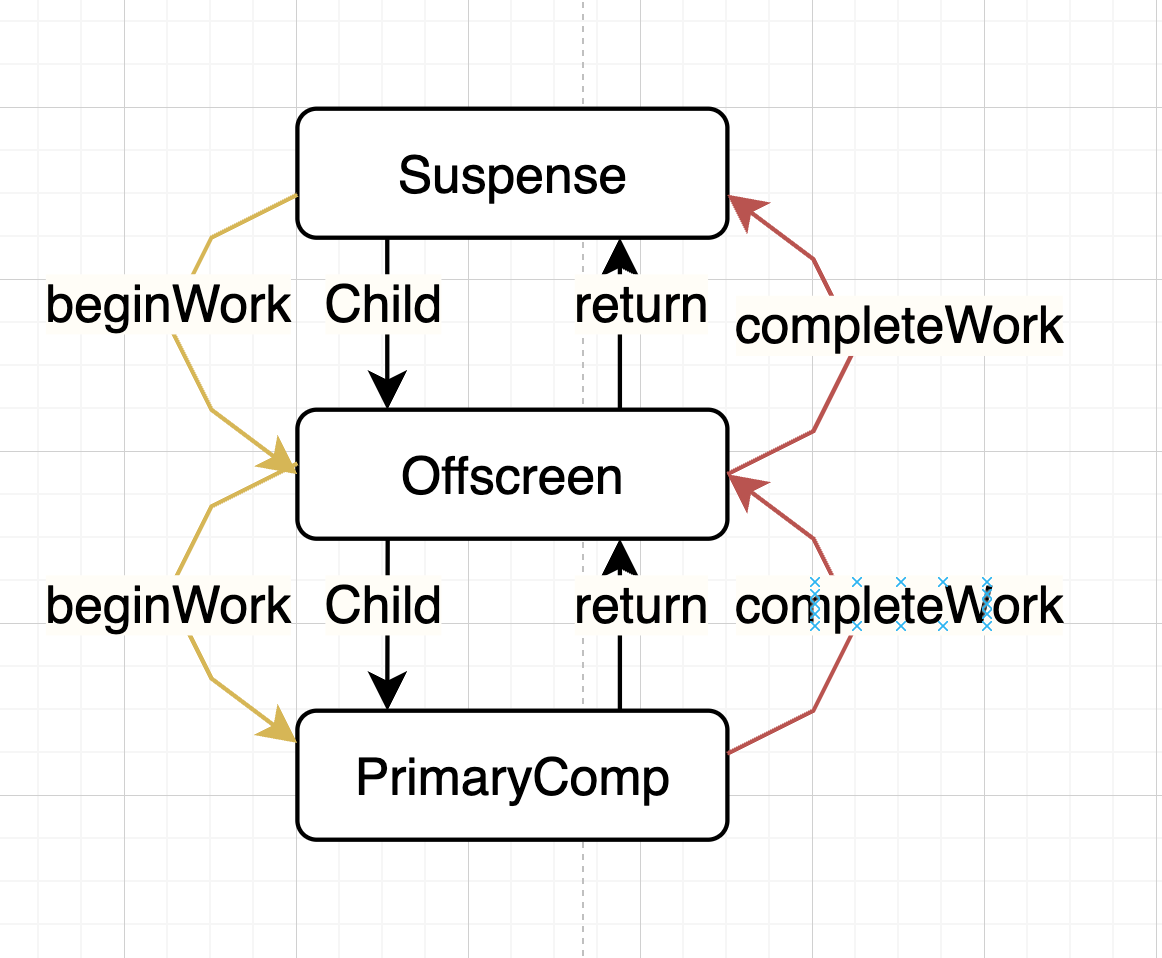
那么为什么要这样做呢?
同时在创建 Offscreen 组件的时候,其会执行 mountWorkInProgressOffscreenFiber 流程,并执行 PrimaryComponent 的 beginWork 流程,从而进入 Lazy 组件的第一次渲染流程。
- 然后执行 Lazy 组件的第一次
init(payload)中的Uninitialized流程,并 throw 异常。 => 进入handleError流程。 - 在
handleError流程中,会通过throwException找到当前组件 并标记ShouldCapture。 - 在
completeUnitOfWork阶段的unwindWork流程中,会将ShouldCapture转换成DidCapture。
这样就完成了 Suspense 组件的初次渲染流程。
重点
将
SubtreeSuspenseContextMask类型的上下文存储到suspenseStackCursor.current中并压栈,为子节点提供是否有不可见的父级 Suspense 边界的信息。将
Suspense => PriamaryComponent的结构变成Suspense => Offscreen => PriamaryComponent初次执行 Lazy 组件的
init(payload)流程,并通过异常处理流程(handleError)找到当前组件并标记DidCapture类型的 flags 副作用。
Fallback 状态
更新渲染阶段,这时候 Lazy 组件是 Pending 状态,所以这时候不会去渲染 PrimaryComponent 组件,而是会去渲染 fallback 组件。
其核心流程如下:
js
function updateSuspenseComponent(current, workInProgress, renderLanes) {
  const nextProps = workInProgress.pendingProps;

  // 获取当前的 Suspense 上下文
  let suspenseContext: SuspenseContext = suspenseStackCursor.current;
  // 是否需要显示 fallback (加载中状态)
  let showFallback = false;
  // 在 Lazy 组件未加载完成的情况下,其通过throw 异常的方式进入 handleError 流程
  // 通过 throwException 找到当前组件 并标记 ShouldCapture
  // 通过 completeUnitOfWork 阶段的 unwindWork 流程 向上冒泡 将 ShouldCapture 转换成 DidCapture
  const didSuspend = (workInProgress.flags & DidCapture) !== NoFlags;
  // 需要进入加载中状态
  if (
    didSuspend ||
    shouldRemainOnFallback(
      suspenseContext,
      current,
      workInProgress,
      renderLanes
    )
  ) {
    // Something in this boundary's subtree already suspended. Switch to
    // rendering the fallback children.
    showFallback = true;
    workInProgress.flags &= ~DidCapture;
  }

  // 将新的 Suspense 设置到上下文中
  suspenseContext = setDefaultShallowSuspenseContext(suspenseContext);
  // 将新的上下文压栈
  pushSuspenseContext(workInProgress, suspenseContext);

  // This is an update.

  // Special path for hydration
  const prevState: null | SuspenseState = current.memoizedState;
  if (prevState !== null) {
    const dehydrated = prevState.dehydrated;
    if (dehydrated !== null) {
      return updateDehydratedSuspenseComponent(
        current,
        workInProgress,
        didSuspend,
        nextProps,
        dehydrated,
        prevState,
        renderLanes
      );
    }
  }
  // 渲染 fallback 流程
  if (showFallback) {
    const nextFallbackChildren = nextProps.fallback;
    const nextPrimaryChildren = nextProps.children;
    // 更新渲染 fallbackComponent
    const fallbackChildFragment = updateSuspenseFallbackChildren(
      current,
      workInProgress,
      nextPrimaryChildren,
      nextFallbackChildren,
      renderLanes
    );
    const primaryChildFragment: Fiber = (workInProgress.child: any);
    const prevOffscreenState: OffscreenState | null = (current.child: any)
      .memoizedState;
    primaryChildFragment.memoizedState =
      prevOffscreenState === null
        ? mountSuspenseOffscreenState(renderLanes)
        : updateSuspenseOffscreenState(prevOffscreenState, renderLanes);
    if (enableTransitionTracing) {
      const currentTransitions = getSuspendedTransitions();
      if (currentTransitions !== null) {
        const primaryChildUpdateQueue: OffscreenQueue = {
          transitions: currentTransitions,
        };
        primaryChildFragment.updateQueue = primaryChildUpdateQueue;
      }
    }
    primaryChildFragment.childLanes = getRemainingWorkInPrimaryTree(
      current,
      renderLanes
    );
    workInProgress.memoizedState = SUSPENDED_MARKER;
    return fallbackChildFragment;
  }
}- 判断是否显示 fallback 状态。
const didSuspend = (workInProgress.flags & DidCapture) !== NoFlags;
在 Lazy 组件未加载完成的情况下,其通过 throw 异常的方式进入 handleError 流程
- 通过 throwException 找到当前组件 并标记 ShouldCapture
- 通过 completeUnitOfWork 阶段的 unwindWork 流程 向上冒泡 将 ShouldCapture 转换成 DidCapture
- 初始化 Suspense 上下文
同样通过 setDefaultShallowSuspenseContext() 将当前全局变量 suspenseStackCursor.current 设置为 parentContext & SubtreeSuspenseContextMask 类型。这样其所以得子节点都可以通过 const hasInvisibleParentBoundary = hasSuspenseContext(suspenseStackCursor.current,(InvisibleParentSuspenseContext: SuspenseContext),); 判断是否有不可见的父级 Suspense 边界。
同时通过 pushSuspenseContext(workInProgress, suspenseContext); 将当前的 Suspense 上下文压栈。
- 初次渲染 或者 更新渲染 FallbackComponent
这里有一个细节,对于 Suspense 组件来说, 其有两种状态: PrimaryComponent 和 FallbackComponent,且这两种状态是可以相互切换的。那么在PrimaryCompponent 或者 FallbackComponent 状态下,子节点是唯一的么?
实际上并不是,Suspense组件将PrimaryComponent 和 FallbackComponent 两个组件都存放在 Suspense 组件下, 并作为兄弟节点,即如下结构:

js
<Suspense>
  {/* PrimaryComponent */}
  <Offscreen>
    <PrimaryComponent></PrimaryComponent>
  </Offscreen>
  {/* 加载中状态节点 */}
  <Fragment>
    <FallbackComponent></FallbackComponent>
  </Fragment>
</Suspense>
所以解释了为什么在初次渲染的时候,需要将 Suspense => PriamaryComponent 的结构变成 Suspense => Offscreen => PriamaryComponent。
因为每次渲染的时候,PrimaryComponent 组件都是作为一个子节点去渲染的,那么如果不用 Offscreen组件包裹,那就无法控制其隐藏的状态。具体可以看 Offscreen 组件的源码, 在 mode : 'hidden'的情况下,不会显示任何内容。
核心源码为
js
function mountSuspenseFallbackChildren(
  workInProgress,
  primaryChildren,
  fallbackChildren,
  renderLanes
) {
  const mode = workInProgress.mode;
  const progressedPrimaryFragment: Fiber | null = workInProgress.child;
  // 创建一个 mode = hidden 的 Offscreen 组件
  const primaryChildProps: OffscreenProps = {
    mode: "hidden",
    children: primaryChildren,
  };

  let primaryChildFragment;
  let fallbackChildFragment;

  // 初始化渲染 Offscreen 组件
  primaryChildFragment = mountWorkInProgressOffscreenFiber(
    primaryChildProps,
    mode,
    NoLanes
  );
  // 初始化渲染 Fragment 组件
  fallbackChildFragment = createFiberFromFragment(
    fallbackChildren,
    mode,
    renderLanes,
    null
  );
  // 形成 Suspense 组件 => Offscreen => PrimaryComponent
  //                   => Fragment  => FallbackComponent
  primaryChildFragment.return = workInProgress;
  fallbackChildFragment.return = workInProgress;
  primaryChildFragment.sibling = fallbackChildFragment;
  workInProgress.child = primaryChildFragment;
  return fallbackChildFragment;
}
Primary 完成渲染
触发条件
初次渲染阶段添加的异步执行回调了,那么就出修改 Lazy 组件的状态为加载完成resolved._status = Resolved,并执行回调函数 attachPingListener,当异步回调函数执行完成后,会触发 ping 事件,从而 触发pingSuspendedRoot 流程。
js
export function pingSuspendedRoot(
  root: FiberRoot,
  wakeable: Wakeable,
  pingedLanes: Lanes
) {
  // 找到所有的 Ping
  const pingCache = root.pingCache;
  // 删除当前已经返回的 Promise
  if (pingCache !== null) {
    // The wakeable resolved, so we no longer need to memoize, because it will
    // never be thrown again.
    pingCache.delete(wakeable);
  }
  // 生成一个 Update 时间
  const eventTime = requestEventTime();
  // 将 Promise 挂载的 lanes 添加到 root.suspendedLanes 中
  markRootPinged(root, pingedLanes, eventTime);

  warnIfSuspenseResolutionNotWrappedWithActDEV(root);
  // 如果 异步车道正好在当前渲染的车道中,那么这时候可能执行完成后移除车道,导致无法执行当前异步任务的更新
  //  所以需要重置一下当前执行渲染流程
  if (
    workInProgressRoot === root &&
    isSubsetOfLanes(workInProgressRootRenderLanes, pingedLanes)
  ) {
    if (
      workInProgressRootExitStatus === RootSuspendedWithDelay ||
      (workInProgressRootExitStatus === RootSuspended &&
        includesOnlyRetries(workInProgressRootRenderLanes) &&
        now() - globalMostRecentFallbackTime < FALLBACK_THROTTLE_MS)
    ) {
      // Restart from the root.
      prepareFreshStack(root, NoLanes);
    } else {
      // Even though we can't restart right now, we might get an
      // opportunity later. So we mark this render as having a ping.
      //
      workInProgressRootPingedLanes = mergeLanes(
        workInProgressRootPingedLanes,
        pingedLanes
      );
    }
  }
  // 调和更新
  ensureRootIsScheduled(root, eventTime);
}
执行流程
js
function updateSuspenseComponent(current, workInProgress, renderLanes) {
  // 在 Lazy 组件未加载完成的情况下,其通过throw 异常的方式进入 handleError 流程
  // 通过 throwException 找到当前组件 并标记 ShouldCapture
  // 通过 completeUnitOfWork 阶段的 unwindWork 流程 向上冒泡 将 ShouldCapture 转换成 DidCapture
  const didSuspend = (workInProgress.flags & DidCapture) !== NoFlags;
  // 渲染 Primary 子节点
  const nextPrimaryChildren = nextProps.children;
  const primaryChildFragment = updateSuspensePrimaryChildren(
    current,
    workInProgress,
    nextPrimaryChildren,
    renderLanes
  );
  // 清除缓存的 state
  workInProgress.memoizedState = null;
  return primaryChildFragment;
}
其核心判断 const didSuspend = (workInProgress.flags & DidCapture) !== NoFlags为 fasle 的情况下执行 updateSuspensePrimaryChildren, 所以其核心代码如下
js
function updateSuspensePrimaryChildren(
  current,
  workInProgress,
  primaryChildren,
  renderLanes
) {
  const currentPrimaryChildFragment: Fiber = (current.child: any);
  const currentFallbackChildFragment: Fiber | null =
    currentPrimaryChildFragment.sibling;

  // 以 visible 模式去更新 Offscreen 组件
  const primaryChildFragment = updateWorkInProgressOffscreenFiber(
    currentPrimaryChildFragment,
    {
      mode: "visible",
      children: primaryChildren,
    }
  );
  if ((workInProgress.mode & ConcurrentMode) === NoMode) {
    primaryChildFragment.lanes = renderLanes;
  }
  // 修改 Offscreen 组件的返回节点为 Suspense 组件
  primaryChildFragment.return = workInProgress;
  // 将 Fallback 组件从 Suspense 组件中移除
  primaryChildFragment.sibling = null;
  // 如果 Fallback 组件存在 那么执行 Fallback 组件的删除操作 (ChildDeletion 副作用)
  if (currentFallbackChildFragment !== null) {
    // Delete the fallback child fragment
    const deletions = workInProgress.deletions;
    if (deletions === null) {
      // fallback 组件添加到 待删除列表中
      workInProgress.deletions = [currentFallbackChildFragment];
      // 添加子节点移除副作用
      workInProgress.flags |= ChildDeletion;
    } else {
      deletions.push(currentFallbackChildFragment);
    }
  }
  workInProgress.child = primaryChildFragment;
  return primaryChildFragment;
}
此流程是 Suspense 组件下异步组件加载完成的时候触发的,从而去更新 Suspense 组件的 Primary 子节点,主要流程如下:
- 以 visible 模式去更新 Offscreen 组件
- 将
Fallback组件从 Suspense 组件中移除
这样原来
Suspense => Offscreen => PriamaryComponent
         => Fragment => FallbackComponent
的结构就变成了 Suspense => Offscreen => PriamaryComponent了。另外因为删除了 FallbackComponent 组件,所以需要创建一个 ChildDeletion 副作用,并将其添加到 Suspense.deletion 数组中 和 添加 Suspense.flags |= ChildDeletion 副作用, 从而在下次 Commit 流程的时候,执行删除操作
- 修改 Suspense.child 和 PrimaryComponent.return 的指向
总结
对于 Suspense 组件来说,其有两种状态: PrimaryComponent 和 FallbackComponent,且通过 const didSuspend = (workInProgress.flags & DidCapture)!== NoFlags; 来判断是否需要进入 fallback 状态。
当初次渲染的时候,其会执行
PrimaryComponent状态的渲染,然后进入到Lazy组件的init(payload)流程,从而根据UnIn状态去发起资源的请求 ,并通过 抛出异常的方式,在handleError()通过向上遍历的方式找到最近的Suspense组件,并将其添加DidCapture副作用。在下次渲染的时候,会判断
const didSuspend = (workInProgress.flags & DidCapture)!== NoFlags;为 true 的情况下,进入 fallback 状态,从而渲染FallbackComponent组件。
这时候需要注意的是,在 fallback 状态下,并不是移除初次渲染的 PrimaryComponent 组件,而是将其隐藏(Offscreen 组件的 mode 变成 hidden ),从而避免了 PrimaryComponent 组件的卸载。并形成 Primary 组件和 Fallback 组件的兄弟节点的结构。同时移除 DidCapture副作用。
shell
Suspense => Offscreen => PriamaryComponent
=> Fragment => FallbackComponent`- 下次渲染的时候,如果异步组件还没有加载完成,那么这时候仍然进入 Primary 状态,但是 Primary 组件和
fallback组件仍然挂载在 Suspense 组件下
- 先进入
Lazy组件的init(payload)流程,但是因为其payload._status === Pending所以不会发起资源的请求。而是直接进入Pending状态, 并抛出异常,重复 2 的流程。 - 执行 fallback 的清除操作
然后因为存在 DidCapture 副作用,所以再次渲染会又执行 2 的流程
- 异步组件加载完成后,会触发 Lazy 组件的状态为加载完成(Resolved),并通过 Ping 触发
pingSuspendedRoot流程,从而再次进入渲染流程。
这时候执行到 Suspense组件的时候,其状态是 Primary 状态,但是 Primary 组件和fallback组件仍然挂载在 Suspense 组件下,所以依次会
- 执行 Lazy 组件的渲染,这时候发现其状态变成
Resolved,不会触发异常处理,正常往下走。 - 执行 fallback 的清除操作
这里面涉及到一个比较重要的组件 Offscreen 组件, 下面我们去看一下这个组件