
Appearance
事件触发
React 中对于合成事件的触发不是触发在目标对象上,而是通过事件委托的方式,将事件的触发统一放到 FiberRootNode 根节点上,然后根据 target['__reactFiber$' + randomKey] 获取目标 FiberNode 节点实例对象,再通过向上遍历的方式获取到从目标节点到 Root 上注册的此事件的 listener 对象,从而构建出整个事件流,最后通过 processDispatchQueue 对事件进行回调执行。
所有事件触发的核心方法都是 dipatchEvent 函数
dipatchEvent
从上面我们也就可以大体了解 React 事件的执行流程了,主要分为以下步骤
- 根据 target 抹平平台差异获取到真正的 target 对象
- 根据 target(DOM)获取到 completeWork 阶段缓存到 DOM 节点上的 目标元素的 FiberNode 对象
- 通过 FiberNode.return 循环遍历出这个链上注册事件的 listener 对象
- 按照事件的
Capture的不同或从前到后 或 从后到前遍历执行 listener
同时我们也要知道 React 合成事件的特点:
- React 事件的池化
- React 的事件 event 对象是共享的,在事件执行完成后就会被销毁
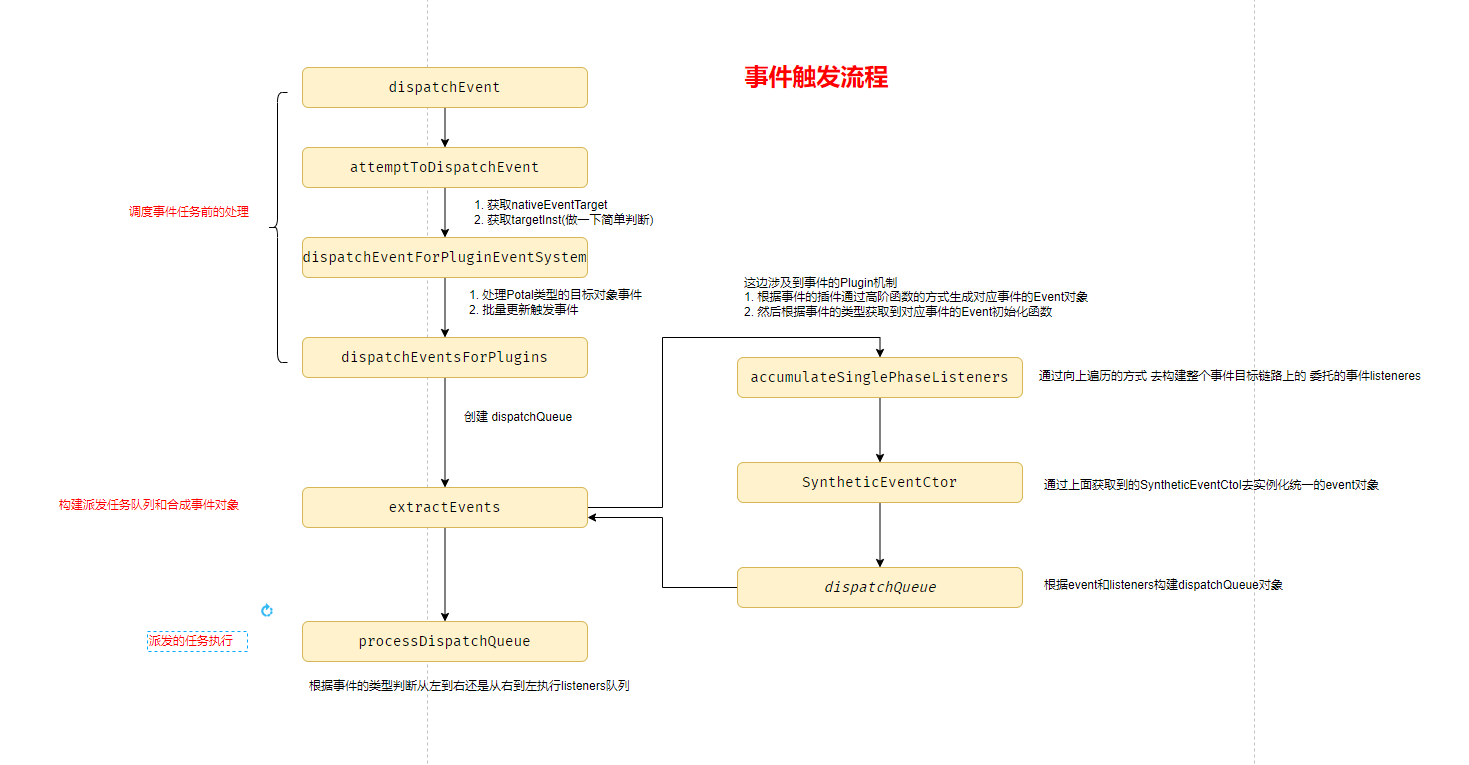
attemptToDispatchEvent()
其主要作用是:
获取事件的 target , 兼容性处理 IE 为 srcElement
获取目标元素对应的 FiberNode 对象,并做一定的处理
- 如果是有插入 Placement 副作用的元素节点, targetInst = null
- 如果是 HostRoot 根节点,return 单独处理
- 如果是 SuspenseComponent 类型的节点 获取其 suspenseState.dehydrated
js
// Attempt dispatching an event. Returns a SuspenseInstance or Container if it's blocked.
/**
 *  其任务是
 *  1.  获取事件的 target , 兼容性处理 IE 为 srcElement
 *  2.  获取目标元素对应的 FiberNode 对象,并做一定的处理
 *      - 如果是有插入Placement副作用的元素节点, targetInst = null
 *      - 如果是 HostRoot 根节点,return 单独处理
 *      - 如果是 SuspenseComponent 类型的节点  获取其 suspenseState.dehydrated
 *
 *  触发 dispatchEventForPluginEventSystem()
 * @param {*} domEventName
 * @param {*} eventSystemFlags
 * @param {*} targetContainer
 * @param {*} nativeEvent
 * @returns
 */
export function attemptToDispatchEvent(
  domEventName: DOMEventName,
  eventSystemFlags: EventSystemFlags,
  targetContainer: EventTarget,
  nativeEvent: AnyNativeEvent
): null | Container | SuspenseInstance {
  // TODO: Warn if _enabled is false.
  // 获取事件的 target , 兼容性处理 IE 为 srcElement
  const nativeEventTarget = getEventTarget(nativeEvent);
  // 获取目标元素对应的FiberNode实例对象
  // 取巧的方式 在completeWork创建DOM的过程中会将其FiberNode对象缓存到DOM的"__reactFiber$h7mblvmf5m"属性上
  let targetInst = getClosestInstanceFromNode(nativeEventTarget);

  // 对于目标FiberNode 进行判断
  //  1. 是否为有插入effect的元素节点 ,还没有插入到浏览器 怎么触发事件
  //  2. SuspenseComponent 类型的
  if (targetInst !== null) {
    const nearestMounted = getNearestMountedFiber(targetInst);
    if (nearestMounted === null) {
      // This tree has been unmounted already. Dispatch without a target.
      targetInst = null;
    } else {
      const tag = nearestMounted.tag;
      if (tag === SuspenseComponent) {
        const instance = getSuspenseInstanceFromFiber(nearestMounted);
        if (instance !== null) {
          // Queue the event to be replayed later. Abort dispatching since we
          // don't want this event dispatched twice through the event system.
          // TODO: If this is the first discrete event in the queue. Schedule an increased
          // priority for this boundary.
          return instance;
        }
        // This shouldn't happen, something went wrong but to avoid blocking
        // the whole system, dispatch the event without a target.
        // TODO: Warn.
        targetInst = null;
      } else if (tag === HostRoot) {
        const root: FiberRoot = nearestMounted.stateNode;
        if (root.hydrate) {
          // If this happens during a replay something went wrong and it might block
          // the whole system.
          return getContainerFromFiber(nearestMounted);
        }
        targetInst = null;
      } else if (nearestMounted !== targetInst) {
        // If we get an event (ex: img onload) before committing that
        // component's mount, ignore it for now (that is, treat it as if it was an
        // event on a non-React tree). We might also consider queueing events and
        // dispatching them after the mount.
        targetInst = null;
      }
    }
  }
  // 进行相关事件任务的调度
  dispatchEventForPluginEventSystem(
    domEventName,
    eventSystemFlags,
    nativeEvent,
    targetInst,
    targetContainer
  );
  // We're not blocked on anything.
  return null;
}
dispatchEventForPluginEventSystem()
其主要作用是:
- 处理目标元素为 Potal 类型组件的事件
- 按照批量更新的方式 调度 dispatchEventsForPlugins
js
/**
 * 核心任务是
 *  1. 处理Potal类型组件的事件
 *  2. 按照批量更新的方式 调度 dispatchEventsForPlugins
 *
 * @param {*} domEventName
 * @param {*} eventSystemFlags
 * @param {*} nativeEvent
 * @param {*} targetInst
 * @param {*} targetContainer
 * @returns
 */
export function dispatchEventForPluginEventSystem(
  domEventName: DOMEventName,
  eventSystemFlags: EventSystemFlags,
  nativeEvent: AnyNativeEvent,
  targetInst: null | Fiber,
  targetContainer: EventTarget
): void {
  let ancestorInst = targetInst;
  if (
    (eventSystemFlags & IS_EVENT_HANDLE_NON_MANAGED_NODE) === 0 &&
    (eventSystemFlags & IS_NON_DELEGATED) === 0
  ) {
    const targetContainerNode = ((targetContainer: any): Node);

    // If we are using the legacy FB support flag, we
    // defer the event to the null with a one
    // time event listener so we can defer the event.
    if (
      enableLegacyFBSupport &&
      // If our event flags match the required flags for entering
      // FB legacy mode and we are prcocessing the "click" event,
      // then we can defer the event to the "document", to allow
      // for legacy FB support, where the expected behavior was to
      // match React < 16 behavior of delegated clicks to the doc.
      domEventName === "click" &&
      (eventSystemFlags & SHOULD_NOT_DEFER_CLICK_FOR_FB_SUPPORT_MODE) === 0
    ) {
      deferClickToDocumentForLegacyFBSupport(domEventName, targetContainer);
      return;
    }
    if (targetInst !== null) {
      let node = targetInst;

      mainLoop: while (true) {
        if (node === null) {
          return;
        }
        const nodeTag = node.tag;
        if (nodeTag === HostRoot || nodeTag === HostPortal) {
          let container = node.stateNode.containerInfo;
          if (isMatchingRootContainer(container, targetContainerNode)) {
            break;
          }
          if (nodeTag === HostPortal) {
            // The target is a portal, but it's not the rootContainer we're looking for.
            // Normally portals handle their own events all the way down to the root.
            // So we should be able to stop now. However, we don't know if this portal
            // was part of *our* root.
            let grandNode = node.return;
            while (grandNode !== null) {
              const grandTag = grandNode.tag;
              if (grandTag === HostRoot || grandTag === HostPortal) {
                const grandContainer = grandNode.stateNode.containerInfo;
                if (
                  isMatchingRootContainer(grandContainer, targetContainerNode)
                ) {
                  // This is the rootContainer we're looking for and we found it as
                  // a parent of the Portal. That means we can ignore it because the
                  // Portal will bubble through to us.
                  return;
                }
              }
              grandNode = grandNode.return;
            }
          }
          // Now we need to find it's corresponding host fiber in the other
          // tree. To do this we can use getClosestInstanceFromNode, but we
          // need to validate that the fiber is a host instance, otherwise
          // we need to traverse up through the DOM till we find the correct
          // node that is from the other tree.
          while (container !== null) {
            const parentNode = getClosestInstanceFromNode(container);
            if (parentNode === null) {
              return;
            }
            const parentTag = parentNode.tag;
            if (parentTag === HostComponent || parentTag === HostText) {
              node = ancestorInst = parentNode;
              continue mainLoop;
            }
            container = container.parentNode;
          }
        }
        node = node.return;
      }
    }
  }

  batchedEventUpdates(() =>
    dispatchEventsForPlugins(
      domEventName,
      eventSystemFlags,
      nativeEvent,
      ancestorInst,
      targetContainer
    )
  );
}
dispatchEventsForPlugins()
之前的方法都是对依赖对象的处理和判断,这个才是事件触发的核心过程
js
/**
 * 真正的调度任务了
 * @param {} domEventName
 * @param {*} eventSystemFlags
 * @param {*} nativeEvent
 * @param {*} targetInst
 * @param {*} targetContainer
 */
function dispatchEventsForPlugins(
  domEventName: DOMEventName,
  eventSystemFlags: EventSystemFlags,
  nativeEvent: AnyNativeEvent,
  targetInst: null | Fiber,
  targetContainer: EventTarget
): void {
  // 获取target
  const nativeEventTarget = getEventTarget(nativeEvent);
  // 存放 事件调度任务的队列 -
  const dispatchQueue: DispatchQueue = [];
  // 获取目标对象到root链路上注册的事件,并保存到dispatchQueue队列中
  extractEvents(
    dispatchQueue,
    domEventName,
    targetInst,
    nativeEvent,
    nativeEventTarget,
    eventSystemFlags,
    targetContainer
  );

  processDispatchQueue(dispatchQueue, eventSystemFlags);
}
extractEvents()
这个就涉及到事件的插件机制
其主要流程是:
在插件初始化的时候会通过高阶函数的方式生成不同类型的事件其 event 实例对象构造方法
SyntheticMouseEventSyntheticDragEventSyntheticKeyboardEventSyntheticPointerEventSyntheticTouchEventSyntheticTransitionEventSyntheticWheelEvent...
根据事件的名称获取其对应的 event 实例对象构造方法
通过向上遍历的方式生成从 targetInst 到 Root 这个链上注册事件的 listener 对象
实例化一个
SyntheticEventCtor 对象(这条链上事件回调函数公用)生成
DispatchQueue
合成事件对象构造方法
我们先简单看一下 mouse 类型的事件其构造方法为通过 createSyntheticEvent(MouseEventInterface) 生成,其核心是通过createSyntheticEvent()中的SyntheticBaseEvent去生成所有的事件共有的属性和方法,然后通过不同的事件类型提供的interface去拓展各自的事件实例对象 SyntheticEvent
我们看一下SyntheticBaseEvent()
js
/**
 * 所有合成事件Event对象的基类
 * @param {*} reactName       事件在React定义的名称 如 onClick
 * @param {*} reactEventType  事件的原生类型           click
 * @param {*} targetInst      事件的目标元素的FiberNode对象
 * @param {*} nativeEvent     事件的目标元素的 原生 事件对象
 * @param {*} nativeEventTarget 事件目标元素的 原生 e.target 对象
 * @returns
 */
function SyntheticBaseEvent(
  reactName: string | null,
  reactEventType: string,
  targetInst: Fiber,
  nativeEvent: { [propName: string]: mixed },
  nativeEventTarget: null | EventTarget
) {
  this._reactName = reactName;
  this._targetInst = targetInst;
  this.type = reactEventType;
  this.nativeEvent = nativeEvent;
  this.target = nativeEventTarget;
  this.currentTarget = null;

  for (const propName in Interface) {
    if (!Interface.hasOwnProperty(propName)) {
      continue;
    }
    const normalize = Interface[propName];
    if (normalize) {
      this[propName] = normalize(nativeEvent);
    } else {
      this[propName] = nativeEvent[propName];
    }
  }

  const defaultPrevented =
    nativeEvent.defaultPrevented != null
      ? nativeEvent.defaultPrevented
      : nativeEvent.returnValue === false;
  if (defaultPrevented) {
    this.isDefaultPrevented = functionThatReturnsTrue;
  } else {
    this.isDefaultPrevented = functionThatReturnsFalse;
  }
  this.isPropagationStopped = functionThatReturnsFalse;
  return this;
}

Object.assign(SyntheticBaseEvent.prototype, {
  // 提供统一的合成事件的 阻止默认行为的方法
  preventDefault: function () {
    this.defaultPrevented = true;
    const event = this.nativeEvent;
    if (!event) {
      return;
    }

    if (event.preventDefault) {
      event.preventDefault();
      // $FlowFixMe - flow is not aware of `unknown` in IE
    } else if (typeof event.returnValue !== "unknown") {
      event.returnValue = false;
    }
    this.isDefaultPrevented = functionThatReturnsTrue;
  },
  // 提供统一的合成事件的 阻止冒泡或者捕获的方法
  stopPropagation: function () {
    const event = this.nativeEvent;
    if (!event) {
      return;
    }

    if (event.stopPropagation) {
      event.stopPropagation();
      // $FlowFixMe - flow is not aware of `unknown` in IE
    } else if (typeof event.cancelBubble !== "unknown") {
      event.cancelBubble = true;
    }
    this.isPropagationStopped = functionThatReturnsTrue;
  },

  persist: function () {
    // Modern event system doesn't use pooling.
  },
  isPersistent: functionThatReturnsTrue,
});
我们先看简单类型的事件
简单事件类型
js
/**
 * 简单事件插件的 提取任务对象的方法
 *
 *  1. 根据事件类型获取初始化(高阶函数返回的事件event Class对象)
 *  2. accumulateSinglePhaseListeners
 *      构建从目标对象到root这里链路上注册了此事件的方法
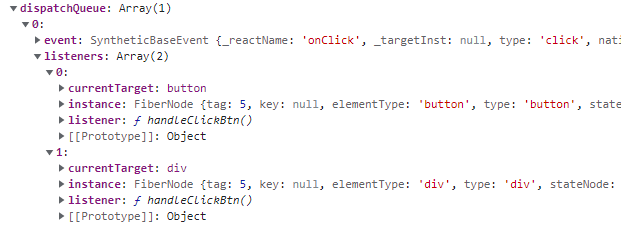
 *  3. 如果有注册事件方法,那么就初始化一个统一的 event实例对象
 *    其存储结构为 { event ,  listeners : [ 事件button(DispatchListener) , 事件div(DispatchListener) ] }
 * @param {*} dispatchQueue
 * @param {*} domEventName
 * @param {*} targetInst
 * @param {*} nativeEvent
 * @param {*} nativeEventTarget
 * @param {*} eventSystemFlags
 * @param {*} targetContainer
 * @returns
 */
function extractEvents(
  dispatchQueue: DispatchQueue,
  domEventName: DOMEventName,
  targetInst: null | Fiber,
  nativeEvent: AnyNativeEvent,
  nativeEventTarget: null | EventTarget,
  eventSystemFlags: EventSystemFlags,
  targetContainer: EventTarget
): void {
  // 获取事件的名称
  const reactName = topLevelEventsToReactNames.get(domEventName);
  if (reactName === undefined) {
    return;
  }
  let SyntheticEventCtor = SyntheticEvent;
  let reactEventType: string = domEventName;
  // 根据事件名称的不同 获取不同的event对象
  switch (domEventName) {
    case "keypress":
      // Firefox creates a keypress event for function keys too. This removes
      // the unwanted keypress events. Enter is however both printable and
      // non-printable. One would expect Tab to be as well (but it isn't).
      if (getEventCharCode(((nativeEvent: any): KeyboardEvent)) === 0) {
        return;
      }
    /* falls through */
    case "keydown":
    case "keyup":
      SyntheticEventCtor = SyntheticKeyboardEvent;
      break;
    case "focusin":
      reactEventType = "focus";
      SyntheticEventCtor = SyntheticFocusEvent;
      break;
    case "focusout":
      reactEventType = "blur";
      SyntheticEventCtor = SyntheticFocusEvent;
      break;
    case "beforeblur":
    case "afterblur":
      SyntheticEventCtor = SyntheticFocusEvent;
      break;
    case "click":
      // Firefox creates a click event on right mouse clicks. This removes the
      // unwanted click events.
      if (nativeEvent.button === 2) {
        return;
      }
    /* falls through */
    case "auxclick":
    case "dblclick":
    case "mousedown":
    case "mousemove":
    case "mouseup":
    // TODO: Disabled elements should not respond to mouse events
    /* falls through */
    case "mouseout":
    case "mouseover":
    case "contextmenu":
      SyntheticEventCtor = SyntheticMouseEvent;
      break;
    case "drag":
    case "dragend":
    case "dragenter":
    case "dragexit":
    case "dragleave":
    case "dragover":
    case "dragstart":
    case "drop":
      SyntheticEventCtor = SyntheticDragEvent;
      break;
    case "touchcancel":
    case "touchend":
    case "touchmove":
    case "touchstart":
      SyntheticEventCtor = SyntheticTouchEvent;
      break;
    case ANIMATION_END:
    case ANIMATION_ITERATION:
    case ANIMATION_START:
      SyntheticEventCtor = SyntheticAnimationEvent;
      break;
    case TRANSITION_END:
      SyntheticEventCtor = SyntheticTransitionEvent;
      break;
    case "scroll":
      SyntheticEventCtor = SyntheticUIEvent;
      break;
    case "wheel":
      SyntheticEventCtor = SyntheticWheelEvent;
      break;
    case "copy":
    case "cut":
    case "paste":
      SyntheticEventCtor = SyntheticClipboardEvent;
      break;
    case "gotpointercapture":
    case "lostpointercapture":
    case "pointercancel":
    case "pointerdown":
    case "pointermove":
    case "pointerout":
    case "pointerover":
    case "pointerup":
      SyntheticEventCtor = SyntheticPointerEvent;
      break;
    default:
      // Unknown event. This is used by createEventHandle.
      break;
  }

  // 是否是捕获阶段触发的
  const inCapturePhase = (eventSystemFlags & IS_CAPTURE_PHASE) !== 0;
  if (
    enableCreateEventHandleAPI &&
    eventSystemFlags & IS_EVENT_HANDLE_NON_MANAGED_NODE
  ) {
    // 获取目标对象及其祖先中注册了此类型事件的 listeners 数组
    const listeners = accumulateEventHandleNonManagedNodeListeners(
      // TODO: this cast may not make sense for events like
      // "focus" where React listens to e.g. "focusin".
      ((reactEventType: any): DOMEventName),
      targetContainer,
      inCapturePhase
    );
    if (listeners.length > 0) {
      // Intentionally create event lazily.
      // 创建一个 事件实例对象
      const event = new SyntheticEventCtor(
        reactName,
        reactEventType,
        null,
        nativeEvent,
        nativeEventTarget
      );
      // 保存到 调度队列中
      dispatchQueue.push({ event, listeners });
    }
  } else {
    // Some events don't bubble in the browser.
    // In the past, React has always bubbled them, but this can be surprising.
    // We're going to try aligning closer to the browser behavior by not bubbling
    // them in React either. We'll start by not bubbling onScroll, and then expand.
    const accumulateTargetOnly =
      !inCapturePhase &&
      // TODO: ideally, we'd eventually add all events from
      // nonDelegatedEvents list in DOMPluginEventSystem.
      // Then we can remove this special list.
      // This is a breaking change that can wait until React 18.
      domEventName === "scroll";
    // 通过向上遍历的方式 去构建整个事件目标链路上的 委托的事件listeneres
    const listeners = accumulateSinglePhaseListeners(
      targetInst,
      reactName,
      nativeEvent.type,
      inCapturePhase,
      accumulateTargetOnly
    );
    if (listeners.length > 0) {
      // Intentionally create event lazily.
      // 生成一个公共的 event 对象
      const event = new SyntheticEventCtor(
        reactName,
        reactEventType,
        null,
        nativeEvent,
        nativeEventTarget
      );
      dispatchQueue.push({ event, listeners });
    }
  }
}
React 事件 DispatchQueue 对象
对于一次事件的触发,其可以在事件冒泡或者事件捕获阶段回调好几个事件函数,那么其怎么维护原生事件流中事件从捕获到冒泡的触发机制的,这就涉及到 React 合成事件的 DispatchQueue 对象和 processDispatchQueue 派发任务执行机制
下面我们分别看如何生成 DispatchQueue 对象 和 任务如何进行派发执行的
- DispatchQueue 对象
accumulateSinglePhaseListeners()
从源码中可见其通过 fiberNode.return 去向上遍历,找到这条链路上绑定了这个事件的属性,然后通过 createDispatchListener(instance, listener, lastHostComponent) 构建了一个包含
- instance FiberNode 实例对象
- listener 事件的回调函数
- lastHostComponent 原生 DOM 数据
的 listener 对象
js
/**
 * 通过向上遍历的方式 去构建整个事件目标链路上的 委托的事件listeneres
 * @param {*} targetFiber
 * @param {*} reactName
 * @param {*} nativeEventType
 * @param {*} inCapturePhase
 * @param {*} accumulateTargetOnly
 * @returns DispatchListener[]
 */
export function accumulateSinglePhaseListeners(
  targetFiber: Fiber | null,
  reactName: string | null,
  nativeEventType: string,
  inCapturePhase: boolean,
  accumulateTargetOnly: boolean,
): Array<DispatchListener> {
  //
  const captureName = reactName !== null ? reactName + 'Capture' : null;
  // 事件的名称
  const reactEventName = inCapturePhase ? captureName : reactName;
  const listeners: Array<DispatchListener> = [];

  let instance = targetFiber;
  let lastHostComponent = null;

  // Accumulate all instances and listeners via the target -> root path.
  while (instance !== null) {
    const {stateNode, tag} = instance;
      // Standard React on* listeners, i.e. onClick or onClickCapture
      if (reactEventName !== null) {
        // 获取组件上定义的 事件 属性内容
        // 如: button 组件上 onClick 的内容
        const listener = getListener(instance, reactEventName);
        // 如果存在
        if (listener != null) {
          // 加入到 事件队列中
          listeners.push(
            createDispatchListener(instance, listener, lastHostComponent),
          );
        }
      }
    }
    if (accumulateTargetOnly) {
      break;
    }
    // 向上循环
    instance = instance.return;
  }
  return listeners;
}然后通过dispatchQueue.push({event, listeners}) 生成了一个当前事件回调队列共享同一个合成事件 Event 对象的队列。
React 事件派发执行的过程
主要是通过
- 捕获类型的事件 从后向前遍历执行
- 冒泡类型的事件 从前先后遍历执行
去维护事件冒泡和捕获的执行顺序的
通过同一个事件执行过程生成一个 dispatchQueue 并共享一个 event 对象,在事件回调执行前 currentTarget = currentTarget 和执行后 currentTarget = null 去维护合成事件对象的共享和区分的。
这边还涉及到例外一个问题。
事件的冒泡和事件捕获其实不是一个事件。
如 click 事件,在捕获阶段其事件名称为 onClickCapture 在冒泡阶段才是 onClick
js
/**
 * 回调执行事件
 *  通过将 执行前 currentTarget = currentTarget
 *        执行前 currentTarget = null
 * 去共享一个合成事件对象
 * @param {*} event
 * @param {*} listener
 * @param {*} currentTarget
 */
function executeDispatch(
  event: ReactSyntheticEvent,
  listener: Function,
  currentTarget: EventTarget
): void {
  const type = event.type || "unknown-event";
  // 修改event对象的目标对象为本身
  event.currentTarget = currentTarget;
  // 回调事件方法
  invokeGuardedCallbackAndCatchFirstError(type, listener, undefined, event);
  // 重置 currentTarget
  event.currentTarget = null;
}

/**
 * 派发事件执行的过程
 *  1. 捕获类型的事件 从后向前遍历执行
 *  2. 冒泡类型的事件 从前先后遍历执行
 *
 * @param {*} event
 * @param {*} dispatchListeners
 * @param {*} inCapturePhase
 * @returns
 */
function processDispatchQueueItemsInOrder(
  event: ReactSyntheticEvent,
  dispatchListeners: Array<DispatchListener>,
  inCapturePhase: boolean
): void {
  let previousInstance;
  if (inCapturePhase) {
    // 捕获类型的事件 从后向前遍历执行
    for (let i = dispatchListeners.length - 1; i >= 0; i--) {
      // 获取事件执行 DispatchListener
      const { instance, currentTarget, listener } = dispatchListeners[i];
      // 如果执行了 event.isPropagationStopped() 就停止向下捕获
      if (instance !== previousInstance && event.isPropagationStopped()) {
        return;
      }
      executeDispatch(event, listener, currentTarget);
      previousInstance = instance;
    }
  } else {
    // 冒泡类型的事件 从前先后遍历执行
    for (let i = 0; i < dispatchListeners.length; i++) {
      const { instance, currentTarget, listener } = dispatchListeners[i];
      // 如果执行了 event.isPropagationStopped() 就停止向上冒泡
      if (instance !== previousInstance && event.isPropagationStopped()) {
        return;
      }
      executeDispatch(event, listener, currentTarget);
      previousInstance = instance;
    }
  }
}