
Appearance
2. commitMutationEffects
Commit 阶段对于副作用的第二次遍历处理过程。
前提
在这个阶段每一个 FiberNode 对应的 DOM 元素已经生成,但是没有插入到浏览器中(保存在内存中)
主要作用
在这个阶段主要就是将 DOM 元素更新到浏览器中,所以其最重要的就是对于每一个 FiberNode 根据其对应的副作用, 如 Placement、Update、Deletion 等执行对应的操作,如 Placement => parent.insert 。当然其还有其他作用,如去解绑 ref 的引用,从而在下一个阶段去重新绑定。
在生命周期和 Hooks 的处理上,主要是执行以下几个
- Class 组件的
componentWillUnmount - FunctionalComponent 的
useInsertionEffect,useLayoutEffect
其主要作用如下:
- 对于待删除的旧节点
- 按照深度优先的方式,通过 parent.removeChild 去删除 DOM 元素
- 处理 ref 的引用问题
- 如果是函数类型 ref(null)
- 如果是 useRef() => ref.current = null
- 函数节点类型
- 执行 useInsertionEffect 的 destroy 的回调函数
- 执行 useLayoutEffect 的 destroy 的回调函数
- Class 组件类型
- 处理 ref 的引用问题
- 执行 componentWillUnmount 生命周期函数
- 对于存在其他存在副作用的节点
- 更新 ref 的引用
- 执行 DOM 的 Placement 操作
- 将 DOM 元素更新到浏览器中
- ref.current 的解绑
- useLayoutEffect 销毁函数的回调
- 原生标签元素通过 updateQueue 进行属性的更新
类型分类
FunctionalComponent
对于函数组件类型,在这个阶段主要做通过三段流程去处理
recursivelyTraverseMutationEffects
该函数用于递归遍历 Fiber 树,处理所有与 Mutation(变更)相关的副作用,包括节点删除、ref 清理、effect 卸载等操作。 其主要包含两个遍历流程:
在深度优先遍历的过程中,如果遇到存在 parentFiber.deletions 的时候,会触发新的遍历流程,处理待删除的旧节点。
- 对于待删除的旧节点 按照深度优先的方式,通过 parent.removeChild 去删除 DOM 元素 处理 ref 的引用问题, 即解除 ref 的引用 函数节点 destroy 回调函数 - 执行 useInsertionEffect 的 destroy 的回调函数 - 执行 useLayoutEffect 的 destroy 的回调函数 Class 组件 - 处理 ref 的引用问题 - 执行 componentWillUnmount 生命周期方法 第二次遍历流程
- 执行 DOM 节点的插入和 更新操作
- 执行 DOM 节点的 ref 绑定
commitReconciliationEffects
在 深度优先遍历到叶子节点的时候,会触发 commitReconciliationEffects 函数,处理所有与 Reconciliation(协调)相关的副作用,即主要处理 Fiber 节点的副作用标记,尤其是 Placement(插入/重排)和 Hydrating(水合)相关。
如果当前 Fiber 有 Placement 标记,则调用 commitPlacement 完成插入操作,并在捕获异常后清除 Placement 标记。
如果有 Hydrating 标记,也会被清除。
这样在可以处理 DOM 元素的插入 和 更新操作了,删除操作不在该函数中处理
处理函数组件的 副作用
在 beginWork 阶段中,对于函数式组件会触发函数的回调,并触发所有 hook 在 mount 阶段 或者 update 阶段的执行,同时对于那些如 useImperativeHandle,useInsertionEffect,useLayoutEffect 会更新阶段生成一个 Update 类型的副作用并保存到 FiberNode.flags 中,那么在这个阶段,如果判断组件节点上存在 Update 类型的副作用 flags & Update,就会触发对应的回调函数。
上述对于生成 Update类型副作用的 Hook 存在三种,但是在这个阶段只会执行 useInsertionEffect的 destroy,useInsertionEffect的 create,useLayoutEffect 的 destroy
js
// 更新类型 副作用
if (flags & Update) {
  try {
    // 执行元素的 useInsertionEffect destroy 回调函数
    commitHookEffectListUnmount(
      HookInsertion | HookHasEffect,
      finishedWork,
      finishedWork.return
    );
    // 执行元素的 useInsertionEffect create 回调函数
    commitHookEffectListMount(HookInsertion | HookHasEffect, finishedWork);
  } catch (error) {
    captureCommitPhaseError(finishedWork, finishedWork.return, error);
  }

  try {
    // 执行 useLayoutEffect 的 destroy 函数
    commitHookEffectListUnmount(
      HookLayout | HookHasEffect,
      finishedWork,
      finishedWork.return
    );
  } catch (error) {
    captureCommitPhaseError(finishedWork, finishedWork.return, error);
  }
}
ClassComponent 类型
对于 Class 组件类型,其前两个步骤和 函数组件一样,但是其不存在 Hook,所以不会执行 Hook 的处理。然而其 Ref 的绑定是不一样的,因为对于绑定在函数组件上的 Ref,其本质通过了一个 Ref 类型的组件进行缓冲处理,所以其解绑流程不是在自身,
但是对于 Class 组件,其绑定在本身的 Ref 是直接绑定的, 所以在这个阶段需要进行 Ref 的解绑操作
js
// Ref 的 解绑
if (flags & Ref) {
  if (current !== null) {
    safelyDetachRef(current, current.return);
  }
}
HostComponent 类型
对于元素节点类型,在这个阶段才是做的最多的,其主要做了以下几件事情
其 Ref 也是绑定在本身的,所以这边需要进行 Ref 的解绑操作
进行元素节点 DOM 的操作,如节点的插入、属性的更新、节点的删除
具体看 DOM 更新到浏览器 的过程
HostText 类型
对于文本节点类型,其主要做的是文本内容的更新,当发现节点上存在 Update 类型的副作用的时候,就执行文本节点重新设置文本值的 API(dom.nodeValue = newText)
js
// 更新类型的
if (flags & Update) {
  if (supportsMutation) {
    // 获取文本节点 DOM对象
    const textInstance: TextInstance = finishedWork.stateNode;
    // 获取文本节点的新值
    const newText: string = finishedWork.memoizedProps;

    const oldText: string = current !== null ? current.memoizedProps : newText;

    try {
      commitTextUpdate(textInstance, oldText, newText);
    } catch (error) {
      captureCommitPhaseError(finishedWork, finishedWork.return, error);
    }
  }
}
DOM 更新到浏览器
在这个阶段最主要的就是将 DOM 元素更新到浏览器中,其中可能涉及到以下几种情况
1. 文本重置类型
js
// 文本内容重置
if (flags & ContentReset) {
  commitResetTextContent(nextEffect);
}
比较简单,就是 textContext = ""
2. 插入类型(Placement)
commitPlacement(nextEffect)
注意的是对于兄弟 DOM 节点的查找的过程。
js
/**
 * 插入类型的副作用处理
 * @param {*} finishedWork
 * @returns
 */
function commitPlacement(finishedWork: Fiber): void {
  if (!supportsMutation) {
    return;
  }

  // Recursively insert all host nodes into the parent.
  // 找到祖先中第一个 原生组件类型 的 Fiber
  // div#1 -> App -> div#2  那么div#2的parentFiber就是 div#1 而不是 App
  const parentFiber = getHostParentFiber(finishedWork);

  // Note: these two variables *must* always be updated together.
  // 获取 父Fiber对应的DOM元素
  let parent;
  // 获取 父Fiber 是否可以使用 insert
  let isContainer;
  const parentStateNode = parentFiber.stateNode;
  switch (parentFiber.tag) {
    case HostComponent:
      parent = parentStateNode;
      isContainer = false;
      break;
    case HostRoot:
      parent = parentStateNode.containerInfo;
      isContainer = true;
      break;
    case HostPortal:
      parent = parentStateNode.containerInfo;
      isContainer = true;
      break;
    case FundamentalComponent:
      if (enableFundamentalAPI) {
        parent = parentStateNode.instance;
        isContainer = false;
      }
    // eslint-disable-next-line-no-fallthrough
    default:
      invariant(
        false,
        "Invalid host parent fiber. This error is likely caused by a bug " +
          "in React. Please file an issue."
      );
  }

  if (parentFiber.flags & ContentReset) {
    // Reset the text content of the parent before doing any insertions
    resetTextContent(parent);
    // Clear ContentReset from the effect tag
    parentFiber.flags &= ~ContentReset;
  }

  // 获取DOM结构上真正的DOM元素兄弟节点
  const before = getHostSibling(finishedWork);
  // We only have the top Fiber that was inserted but we need to recurse down its
  // children to find all the terminal nodes.
  if (isContainer) {
    insertOrAppendPlacementNodeIntoContainer(finishedWork, before, parent);
  } else {
    insertOrAppendPlacementNode(finishedWork, before, parent);
  }
}

/**
 * append或者 insertBefore 插入到容器节点中
 * @param {*} node
 * @param {*} before
 * @param {*} parent
 */
function insertOrAppendPlacementNodeIntoContainer(
  node: Fiber,
  before: ?Instance,
  parent: Container
): void {
  const { tag } = node;
  // 是否是原生组件类型的节点
  const isHost = tag === HostComponent || tag === HostText;
  if (isHost || (enableFundamentalAPI && tag === FundamentalComponent)) {
    // 原生组件类型 直接append或者inertBefore
    const stateNode = isHost ? node.stateNode : node.stateNode.instance;
    if (before) {
      insertInContainerBefore(parent, stateNode, before);
    } else {
      appendChildToContainer(parent, stateNode);
    }
  } else if (tag === HostPortal) {
    // If the insertion itself is a portal, then we don't want to traverse
    // down its children. Instead, we'll get insertions from each child in
    // the portal directly.
  } else {
    // 其他的 插入子FiberNode
    const child = node.child;
    if (child !== null) {
      insertOrAppendPlacementNodeIntoContainer(child, before, parent);
      let sibling = child.sibling;
      while (sibling !== null) {
        insertOrAppendPlacementNodeIntoContainer(sibling, before, parent);
        sibling = sibling.sibling;
      }
    }
  }
}
getHostParentFiber(fiber: Fiber)
getHostSibling(fiber: Fiber)
获取第一个 原生组件类型 的兄弟节点。
这是一个非常复杂的操作。因为 React 的 FiberNode 树结构与真正的 DOM 树结构不一定是一一对应的,FiberNode 树中存在需要虚拟的节点(HostPortal、ClassComponent、FunctionComponent),其没有真正的 DOM 元素结构,那么我们 FiberNode.sibling 的节点在 DOM 树上就不一定是其兄弟节点
js
HostRoot -> App -> div#1 -> Child -> div#2
// 真正的DOM结构是
div#root -> div#1  -> div#2
在这种情况下寻找其兄弟节点变得特别的复杂。
如
js
const Child = props => <div>{ props.count }</div>;
      const App = props => {
        return <div>
          {
            visible && (
              <p>1</p>
              <Child count={count} />
            )
          }
          <div id="2"></div>
        </div>
      }
当我们 visible 变成 true 的时候 p 的兄弟节点是什么?
js
FiberNode
div -> p
       Child -> div
       div#2
// 真实的DOM结构
div -> p
       div
       div#2
答案是: div#2
- 为什么不是 div
因为 div 其也是一个 插入类型 的副作用 FiberNode,所以第一次 p 的兄弟节点为 div2 , 然后通过inertBefore(p , div#2)进行插入,然后再进行 div 的插入。
- 对于 div 的插入,其应该是 appendChild ,实际上却是
inertBefore(div , div#2)
同样还是上面的问题,FiberNode 的树与 DOM 树结构不一定相同的,Child 其只是一个虚拟的 DOM 节点。所以其走的是while (node.sibling === null) {}这个过程
我们先简单看一下代码
js
/**
 * 获取原生组件类型的兄弟组件(指数级的操作)
 * @param {*} fiber
 * @returns
 */
function getHostSibling(fiber: Fiber): ?Instance {
  // We're going to search forward into the tree until we find a sibling host
  // node. Unfortunately, if multiple insertions are done in a row we have to
  // search past them. This leads to exponential search for the next sibling.
  // TODO: Find a more efficient way to do this.
  let node: Fiber = fiber;
  siblings: while (true) {
    // If we didn't find anything, let's try the next sibling.
    // 如果兄弟节点为null,那就去寻找其父节点的兄弟节点(判断是否是原生组件类型)
    // 对应下面这个Child插入的这个栗子
    while (node.sibling === null) {
      if (node.return === null || isHostParent(node.return)) {
        // If we pop out of the root or hit the parent the fiber we are the
        // last sibling.
        return null;
      }
      node = node.return;
    }

    /*
    // 将当前父节点作为兄弟节点的父节点
    // 处理 这种情况,div本身没有兄弟节点,但是其在DOM结构上的兄弟节点为 div#2
    // 所以当node.sibling == null 的时候 走到上面的while循环,找到父元素的兄弟节点
    const Child = props => <div>{ props.count }</div>;
      const App = props => {
        return <div>
          {
            visible && (
              <Child count={count} />
            )
          }
          <div id="2"></div>
        </div>
      }
    */
    node.sibling.return = node.return;
    // 赋值兄弟
    node = node.sibling;
    // 如果不是原生类型组件(不具备具体的DOM),需要特殊处理
    while (
      node.tag !== HostComponent &&
      node.tag !== HostText &&
      node.tag !== DehydratedFragment
    ) {
      // If it is not host node and, we might have a host node inside it.
      // Try to search down until we find one.
      // 如果其兄弟节点不是原生类型组件且有插入的副作用 , 继续向下一个兄弟节点
      // 这个兄弟节点会在下一个中处理
      if (node.flags & Placement) {
        // If we don't have a child, try the siblings instead.
        continue siblings;
      }
      // If we don't have a child, try the siblings instead.
      // We also skip portals because they are not part of this host tree.
      // 如果没有子节点 或者是 HostPortal 类型的
      // 对于这种 不会生成DOM元素,继续向下
      if (node.child === null || node.tag === HostPortal) {
        continue siblings;
      } else {
        // 如果有子节点,那就得向子节点遍历了
        node.child.return = node;
        node = node.child;
      }
    }
    // Check if this host node is stable or about to be placed.
    if (!(node.flags & Placement)) {
      // Found it!
      return node.stateNode;
    }
  }
}
3. 更新类型(Update)
js
/**
 * 更新DOM
 * @param {*} current
 * @param {*} finishedWork
 * @returns
 */
function commitWork(current: Fiber | null, finishedWork: Fiber): void {
  switch (finishedWork.tag) {
    case FunctionComponent:
    case ForwardRef:
    case MemoComponent:
    case SimpleMemoComponent:
    case Block: {
      // 执行 useLayoutEffect 的 destroy 的 effect
      commitHookEffectListUnmount(HookLayout | HookHasEffect, finishedWork);
      return;
    }
    case ClassComponent: {
      return;
    }
    // 原生标签组件
    case HostComponent: {
      // DOM元素实例对象
      const instance: Instance = finishedWork.stateNode;
      if (instance != null) {
        // Commit the work prepared earlier.
        const newProps = finishedWork.memoizedProps;
        // For hydration we reuse the update path but we treat the oldProps
        // as the newProps. The updatePayload will contain the real change in
        // this case.
        const oldProps = current !== null ? current.memoizedProps : newProps;
        const type = finishedWork.type;
        // TODO: Type the updateQueue to be specific to host components.
        // 获取组件上更新的队列  ["style",{color: 'green'} ]
        const updatePayload: null | UpdatePayload =
          (finishedWork.updateQueue: any);
        finishedWork.updateQueue = null;
        if (updatePayload !== null) {
          commitUpdate(
            instance,
            updatePayload,
            type,
            oldProps,
            newProps,
            finishedWork
          );
        }
      }
      return;
    }
    // 文本类型
    case HostText: {
      invariant(
        finishedWork.stateNode !== null,
        "This should have a text node initialized. This error is likely " +
          "caused by a bug in React. Please file an issue."
      );
      // 文本的 DOM元素 对象
      const textInstance: TextInstance = finishedWork.stateNode;
      // 新的文本
      const newText: string = finishedWork.memoizedProps;
      // For hydration we reuse the update path but we treat the oldProps
      // as the newProps. The updatePayload will contain the real change in
      // this case.
      // 历史文本
      const oldText: string =
        current !== null ? current.memoizedProps : newText;
      // 进行文本DOM元素的更新操作
      commitTextUpdate(textInstance, oldText, newText);
      return;
    }
    case HostRoot: {
      if (supportsHydration) {
        const root: FiberRoot = finishedWork.stateNode;
        if (root.hydrate) {
          // We've just hydrated. No need to hydrate again.
          root.hydrate = false;
          commitHydratedContainer(root.containerInfo);
        }
      }
      return;
    }
  }
}
核心为
js
/**
 * 提交更新到新的 DOM 节点上
 * 1. 将 props 的差异应用到 DOM 节点上
 * 2. 更新缓存到 DOM 上的 __reactProps$xxx 缓存的 props 数据
 */
export function commitUpdate(
  domElement: Instance,
  updatePayload: Array<mixed>,
  type: string,
  oldProps: Props,
  newProps: Props,
  internalInstanceHandle: Object
): void {
  // Apply the diff to the DOM node.
  // 将 props 的差异应用到 DOM 节点上
  updateProperties(domElement, updatePayload, type, oldProps, newProps);
  // Update the props handle so that we know which props are the ones with
  // with current event handlers.
  // 更新缓存到 DOM 上的 __reactProps$xxx 缓存的 props 数据
  updateFiberProps(domElement, newProps);
}
主要分为两个步骤
- 在
completeUnitOfWork中对于HostComponent类型的节点,会将更新的属性放到updateQueue中 (prepareUpdate()方法),那么在commitMutationEffects阶段,就会将 元素节点上存在的差异属性 更新到 DOM 元素上
js
function updateDOMProperties(
  domElement: Element,
  updatePayload: Array<any>,
  wasCustomComponentTag: boolean,
  isCustomComponentTag: boolean
): void {
  // TODO: Handle wasCustomComponentTag
  //  ["style",{color: 'green'} ]
  for (let i = 0; i < updatePayload.length; i += 2) {
    // 待更新的属性名称
    const propKey = updatePayload[i];
    // 待更新的属性值
    const propValue = updatePayload[i + 1];
    // style 类型的
    if (propKey === STYLE) {
      setValueForStyles(domElement, propValue);
    } else if (propKey === DANGEROUSLY_SET_INNER_HTML) {
      setInnerHTML(domElement, propValue);
    } else if (propKey === CHILDREN) {
      setTextContent(domElement, propValue);
    } else {
      setValueForProperty(domElement, propKey, propValue, isCustomComponentTag);
    }
  }
}- 更新缓存到 DOM 上的
__reactProps$xxx缓存的 props 数据
4. 删除类型(Deletion)
主要流程为
- 递归调用
Fiber节点及其子孙Fiber节点中fiber.tag为ClassComponent的componentWillUnmount生命周期钩子,从页面移除Fiber节点对应DOM节点 - 解绑
ref - 调度
useEffect的销毁函数
栗子
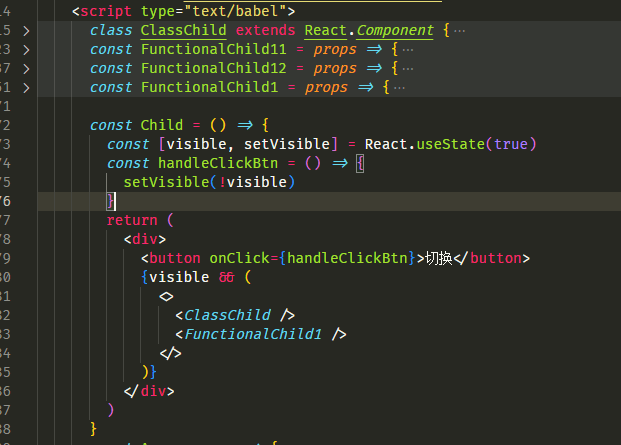
结果为:

源码解析
- 组件卸载的顺序是什么?
其卸载顺序是:
- 从上至下执行组件的卸载流程
- 子孙节点优先,然后是兄弟节点的卸载
txt
 // Child -> Child1 -> Child11 -> Child111
 //                            -> Child112
 //                 -> Child12 -> Child121
 //       -> Child2 -> Child21

 // 其卸载过程是
 // Child -> Child1 -> Child11 -> Child111 -> Child112 -> Child12 -> Child121 -> Child2 -> Child21
js
/**
 * 组件卸载的执行函数
 *  卸载流程:
 *    1. 从上至下执行组件的卸载流程
 *    2. 子孙节点优先,然后是兄弟节点的卸载
 *
 *  Child -> Child1 -> Child11 -> Child111
 *                             -> Child112
 *                  -> Child12 -> Child121
 *        -> Child2 -> Child21
 * 其卸载过程是 Child -> Child1 -> Child11 -> Child111 -> Child112 -> Child12 -> Child121 -> Child2 -> Child21
 */
function commitNestedUnmounts(
  finishedRoot: FiberRoot,
  root: Fiber,
  renderPriorityLevel: ReactPriorityLevel
): void {
  let node: Fiber = root;
  while (true) {
    // 节点本身的卸载工作
    commitUnmount(finishedRoot, node, renderPriorityLevel);
    // Visit children because they may contain more composite or host nodes.
    // Skip portals because commitUnmount() currently visits them recursively.
    // 深度优先遍历的 优先执行节点子孙组件的卸载
    if (
      node.child !== null &&
      // If we use mutation we drill down into portals using commitUnmount above.
      // If we don't use mutation we drill down into portals here instead.
      (!supportsMutation || node.tag !== HostPortal)
    ) {
      node.child.return = node;
      node = node.child;
      continue;
    }
    if (node === root) {
      return;
    }
    // 在执行节点兄弟的卸载工作
    while (node.sibling === null) {
      if (node.return === null || node.return === root) {
        return;
      }
      node = node.return;
    }
    node.sibling.return = node.return;
    node = node.sibling;
  }
}- 卸载涉及到那些函数或者 Hooks
真正执行卸载的是 commitUnmount(finishedRoot, node, renderPriorityLevel)方法,此方法也是通过判断 FiberNode 的类型执行不同的处理方法,下面我们就看一下这个方法(主要是 函数式组件 和 Class 组件)
函数式组件
- useEffect 类型副作用的 destroy 加入到 scheduleCallback 任务队列进行回调
- useLayoutEffect 类型的,直接回调 destroy 函数
所以才有上图中 先执行xxx useLayoutEffect destroy ,然后执行xx useEffect destroy
js
case FunctionComponent:
    case ForwardRef:
    case MemoComponent:
    case SimpleMemoComponent:
    case Block: {
      // 函数式组件
      const updateQueue: FunctionComponentUpdateQueue | null = (current.updateQueue: any);
      if (updateQueue !== null) {
        // 设计的还是 firstEffect lastEffect 副作用队列
        const lastEffect = updateQueue.lastEffect;
        if (lastEffect !== null) {
          const firstEffect = lastEffect.next;

          let effect = firstEffect;
          do {
            const {destroy, tag} = effect;
            // 只有 useLayoutEffect useEffect的副作用才会存在 destroy
            if (destroy !== undefined) {
              /*
               如果是 useEffect 类型的,加入到 scheduleCallback 任务队列进行回调
               如果是其他的如useLayoutEffect类型的,直接回调 destroy函数
              */
              if ((tag & HookPassive) !== NoHookEffect) {
                enqueuePendingPassiveHookEffectUnmount(current, effect);
              } else {
                if (
                  enableProfilerTimer &&
                  enableProfilerCommitHooks &&
                  current.mode & ProfileMode
                ) {
                  startLayoutEffectTimer();
                  safelyCallDestroy(current, destroy);
                  recordLayoutEffectDuration(current);
                } else {
                  safelyCallDestroy(current, destroy);
                }
              }
            }
            effect = effect.next;
          } while (effect !== firstEffect);
        }
      }
      return;
    }
Class 组件
- 解绑 ref
- 执行 Class 组件的 componentWillUnmount 周期函数
js
    // Class 组件类型
    case ClassComponent: {
      // 解绑 ref
      safelyDetachRef(current);
      const instance = current.stateNode;
      //  执行Class组件的componentWillUnmount周期函数
      if (typeof instance.componentWillUnmount === 'function') {
        safelyCallComponentWillUnmount(current, instance);
      }
      return;
    }